Integrating ST and scRNA-seq Data
In this tutorial, we show how to apply CellMirror to integrate ST and scRNA-seq data.
As an example, we use the ST data and paired scRNA-seq data of pancreatic ductal adenocarcinoma (PDAC) patient from Moncada , et al. 2020.,
including 428 spots and 1,926 cells.
Step0: Loading packages (Python)
 1import warnings
 2warnings.filterwarnings("ignore")
 3
 4import os
 5os.environ['R_HOME'] = '/sibcb2/chenluonanlab7/zuochunman/anaconda3/envs/r4.0/lib/R'
 6os.environ['R_USER'] = '/sibcb2/chenluonanlab7/zuochunman/anaconda3/envs/CellMirror/lib/python3.8/site-packages/rpy2'
 7
 8import random
 9import numpy as np
10import scanpy as sc
11import matplotlib.pyplot as plt
12
13from CellMirror_utils.utilities import *
14from CellMirror_utils.layers import *
15from CellMirror_utils.cLDVAE_torch import *
16import torch.utils.data as data_utils
17
18parser = parameter_setting()
19args = parser.parse_known_args()[0]
20
21# Set seed
22np.random.seed(args.seed)
23random.seed(args.seed)
24torch.manual_seed(args.seed)
25torch.cuda.manual_seed(args.seed)
26
27args.lr_cLDVAE = 1e-5; args.gamma = -100
28
29# Set workpath
30Save_path = '/sibcb2/chenluonanlab7/zuochunman/Share_data/xiajunjie/PDAC/'
Step1: Reading and preprocessing data (Python)
 1# Normalization
 2PDAC_A_st = sc.read_h5ad(Save_path + 'PDAC_A_st.h5ad')
 3PDAC_A_st.obs['type'] = 'Spatial'
 4PDAC_A_st.obs['y'] = 100 - PDAC_A_st.obs['y']
 5PDAC_A_st.obsm['spatial'] = PDAC_A_st.obs[['x','y']].values
 6sc.pp.normalize_total(PDAC_A_st)
 7sc.pp.log1p(PDAC_A_st)
 8sc.pp.highly_variable_genes(PDAC_A_st, flavor='seurat', n_top_genes=3000)
 9
10PDAC_A_sc = sc.read_h5ad(Save_path + 'PDAC_A_sc.h5ad')
11PDAC_A_sc.obs['type'] = 'SingleCell'
12sc.pp.normalize_total(PDAC_A_sc)
13sc.pp.log1p(PDAC_A_sc)
14sc.pp.highly_variable_genes(PDAC_A_sc, flavor='seurat', n_top_genes=3000)
15
16common_HVGs=np.intersect1d(list(PDAC_A_sc.var.index[PDAC_A_sc.var['highly_variable']]),list(PDAC_A_st.var.index[PDAC_A_st.var['highly_variable']])).tolist()
17print(len(common_HVGs))
18
19PDAC_A_st, PDAC_A_sc = PDAC_A_st[:,common_HVGs], PDAC_A_sc[:,common_HVGs]
20
21print('\nShape of target object: ', PDAC_A_st.shape, '\tShape of background object: ', PDAC_A_sc.shape)
22
23# Last batch setting
24args = set_last_batchsize(args, PDAC_A_st, PDAC_A_sc)
25
26# Pseudo-data padding
27pseudo_st, pseudo_sc = pseudo_data_padding(PDAC_A_st, PDAC_A_sc)
Step2: Training cLDVAE model (Python)
 1# Dataloader preparation
 2train = data_utils.TensorDataset(torch.from_numpy(pseudo_st),torch.from_numpy(pseudo_sc))
 3train_loader = data_utils.DataLoader(train, batch_size=args.batch_size, shuffle=True)
 4
 5total = data_utils.TensorDataset(torch.from_numpy(pseudo_st),torch.from_numpy(pseudo_sc))
 6total_loader = data_utils.DataLoader(total, batch_size=args.batch_size, shuffle=False)
 7
 8# Run cLDVAE
 9model_cLDVAE = cLDVAE(args=args, n_input=PDAC_A_st.shape[1]).cuda()
10history = model_cLDVAE.fit(train_loader, total_loader)
Step3: Saving cLDVAE outputs (Python)
1# Pseudo-data deparsing
2outputs = model_cLDVAE.predict(total_loader)
3PDAC_A_st.obsm['cLDVAE'], PDAC_A_sc.obsm['cLDVAE'] = pseudo_data_deparser(PDAC_A_st, outputs['tg_z_outputs'], PDAC_A_sc, outputs['bg_z_outputs'])
Step4: Implementing MNN on the processed data (Python)
1# Run MNN
2PDAC_A_st.obsm['CellMirror'], PDAC_A_sc.obsm['CellMirror'] = mnn_correct(PDAC_A_st.obsm['cLDVAE'], PDAC_A_sc.obsm['cLDVAE'])
3
4# Cell type estimation
5PDAC_A_st, PDAC_A_sc = estimate_cell_type(PDAC_A_st, PDAC_A_sc, used_obsm='CellMirror', used_label='cell_type_ductal', neighbors=50)
Step5: Saving results for further visualization (Python)
1# Save data
2colors = np.unique(PDAC_A_sc.obs['cell_type_ductal'].values).tolist()
3sc.pl.spatial(PDAC_A_st, img_key=None, color=colors, color_map=plt.cm.get_cmap('plasma'), ncols=5, spot_size=1, frameon=False, show=False)
4plt.savefig(Save_path + 'PDAC_A_CellMirror_celltype_proportion.jpg', dpi=100)
5
6PDAC_A_st.obs.to_csv(Save_path + 'PDAC_st_CellMirror_celltype_proportion.csv')
7PDAC_A_st.write(Save_path + 'PDAC_A_CellMirror.h5ad', compression='gzip')
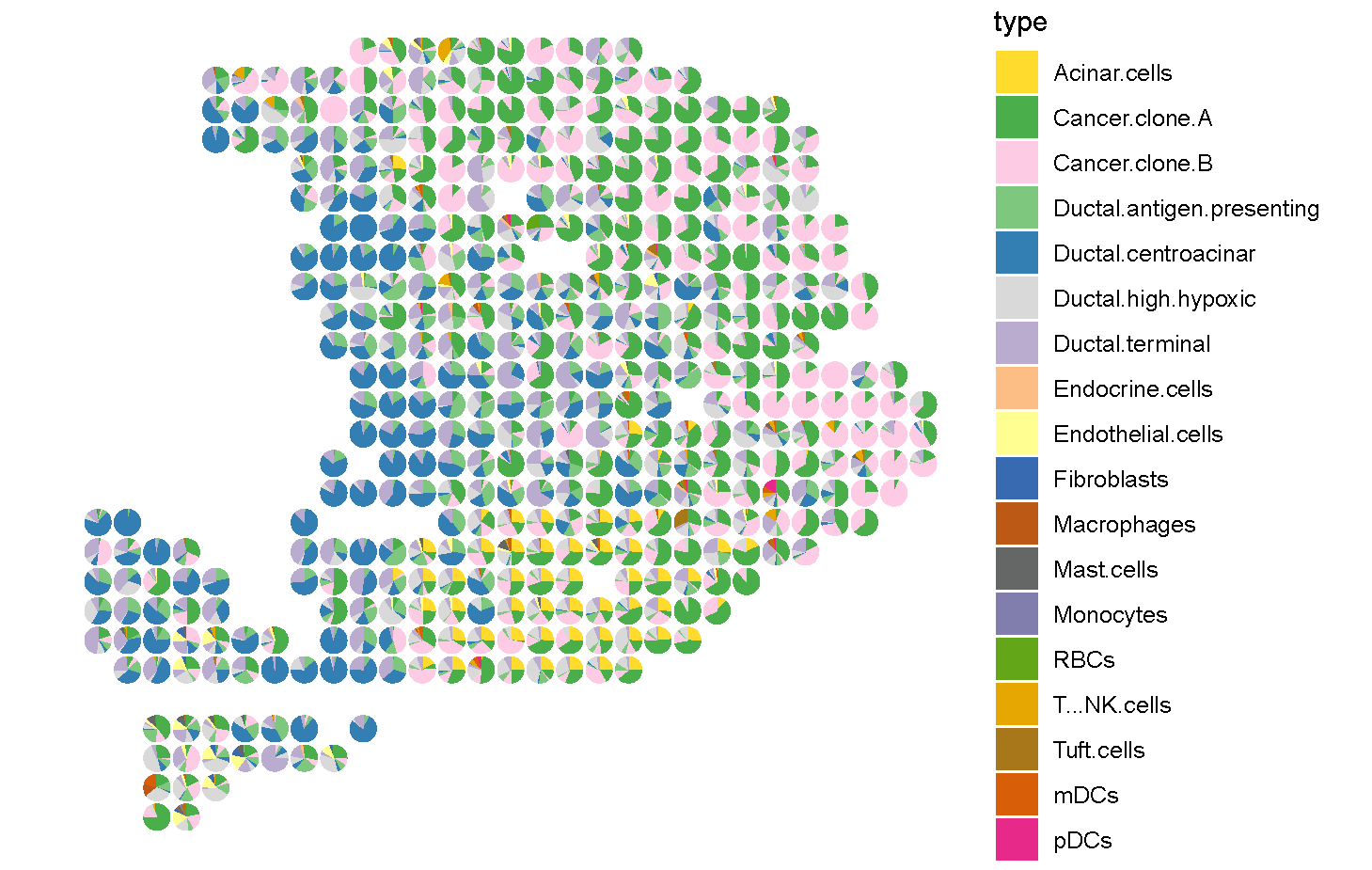
Step6: Visualization (R)
 1PDAC_st <- read.csv('C:\\Users\\我的电脑\\Desktop\\待办\\PDAC_st_CellMirror_celltype_proportion.csv')
 2celltypes <- colnames(PDAC_st)[11:dim(PDAC_st)[2]]
 3
 4suppressMessages(
 5ggplot2::ggplot()
 6+ scatterpie::geom_scatterpie(data = PDAC_st, ggplot2::aes(x = x,y = y), cols = celltypes, color = NA,alpha = 1, pie_scale = 0.8)
 7+ ggplot2::scale_y_reverse()
 8+ ggplot2::theme_void()
 9+ ggplot2::coord_fixed(ratio = 1,xlim = NULL, ylim = NULL, expand = TRUE, clip = "on")
10+ ggplot2::scale_fill_manual(values = c('Acinar.cells'='#FEDB2C',
11                                        'Cancer.clone.A'='#4AAE4B',
12                                        'Cancer.clone.B'='#FDCBE4',
13                                        'Ductal.antigen.presenting'='#7DC87E',
14                                        'Ductal.centroacinar'='#337FB4',
15                                        'Ductal.high.hypoxic'='#D9D9D9',
16                                        'Ductal.terminal'='#BAACCF',
17                                        'Endocrine.cells'='#FCBE84',
18                                        'Endothelial.cells'='#FFFF91',
19                                        'Fibroblasts'='#386AB2',
20                                        'Macrophages'='#BC5914',
21                                        'Mast.cells'='#656666',
22                                        'Monocytes'='#817EAE',
23                                        'RBCs'='#63A618',
24                                        'T...NK.cells'='#E7A703',
25                                        'Tuft.cells'='#A8771A',
26                                        'mDCs'='#D95E08',
27                                        'pDCs'='#E72989')))